Daily Bundles
Download all inspection pictures for a single calendar day as one ZIP archive, organised by terminal and container.
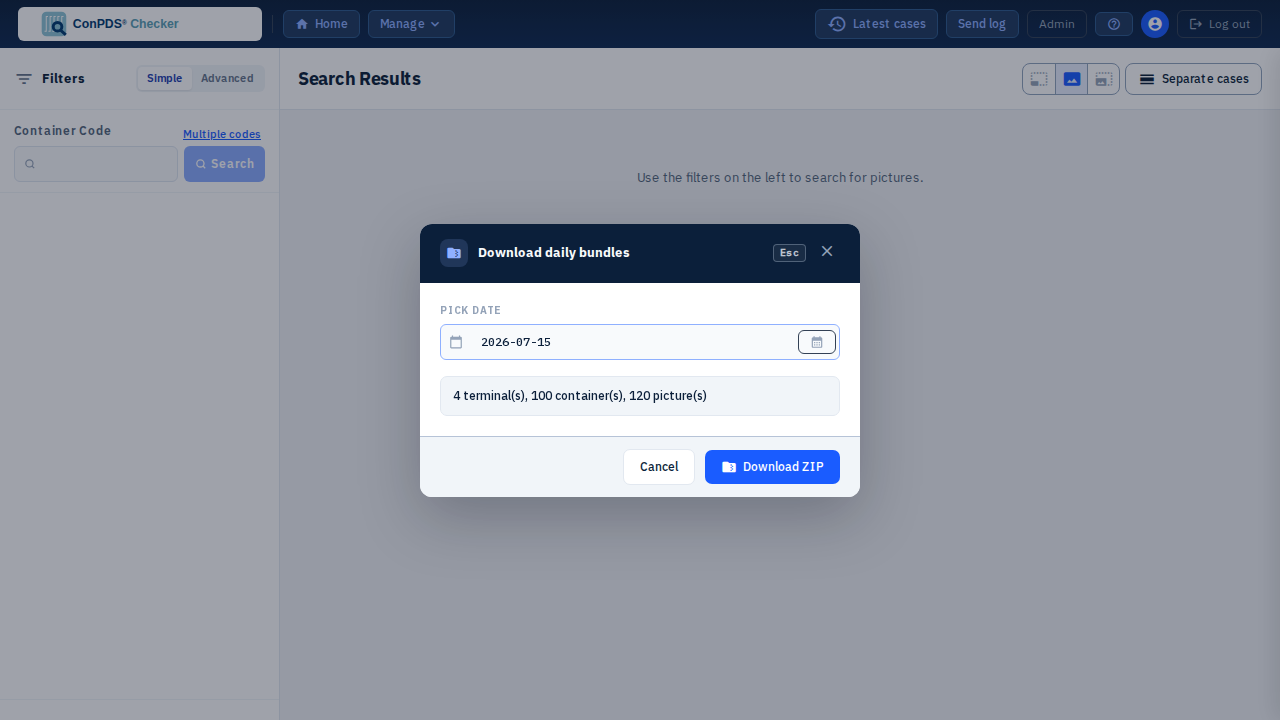
Who can use it
The Manage → Download daily bundles menu item appears only if your account has the DownloadBundle permission (or Admin / SysAdmin). If you do not see the item, ask a tenant administrator to grant DownloadBundle.
How to download
- Open Manage in the tenant header
- Choose Download daily bundles
- Pick a date — days that already have pictures in your accessible terminals are highlighted in the calendar
- Review the summary (terminal count, container count, picture count)
- Click Download ZIP
The browser saves a file named like daily-bundle-<tenant>-YYYY-MM-DD.zip. Large days may show Preparing ZIP on server… then Downloading… while the archive is built asynchronously.
What is inside the ZIP
Folder layout:
TerminalCode/
  ContainerCode/
    picture files…
Only cases for that case date (tenant calendar day) that you are allowed to see are included. Terminal and container folder names are sanitised for ZIP paths.
Tips
- Prefer a day with a modest picture count when testing; very large days take longer to prepare
- Use Upload history or Gallery filters if you need a narrower set than a full day
- Daily bundles are separate from per-case Download ZIP on a case card (that path uses the Download / DownloadZip permissions)
See also: Gallery overview, Case actions